

Is mini led better than qd oled for creation? After digging through manufacturer specs, calibration reports, and hundreds of real user reviews, the short answer is clear. Mini LED wins for bright studios and long screen-heavy sessions.
QD-OLED wins for color-critical grading in dark rooms.
The gap comes down to workflow, not raw numbers. A photo editor leaving static toolbars on screen for eight hours faces real burn-in risk on QD-OLED. A colorist grading HDR footage gets visibly better blacks and color volume.
As of 2026, both panels deliver pro-grade results, but neither covers every use case, so the right pick depends on your specific creative routine.
Quick Answer: It Depends on What You Create
For creation work, one panel isn't objectively better. Mini LED is the safer pick for mixed-use desks and long editing days. QD-OLED delivers superior contrast and color for HDR grading.
The right choice comes down to your lighting, your workload, and your willingness to manage burn-in risk.
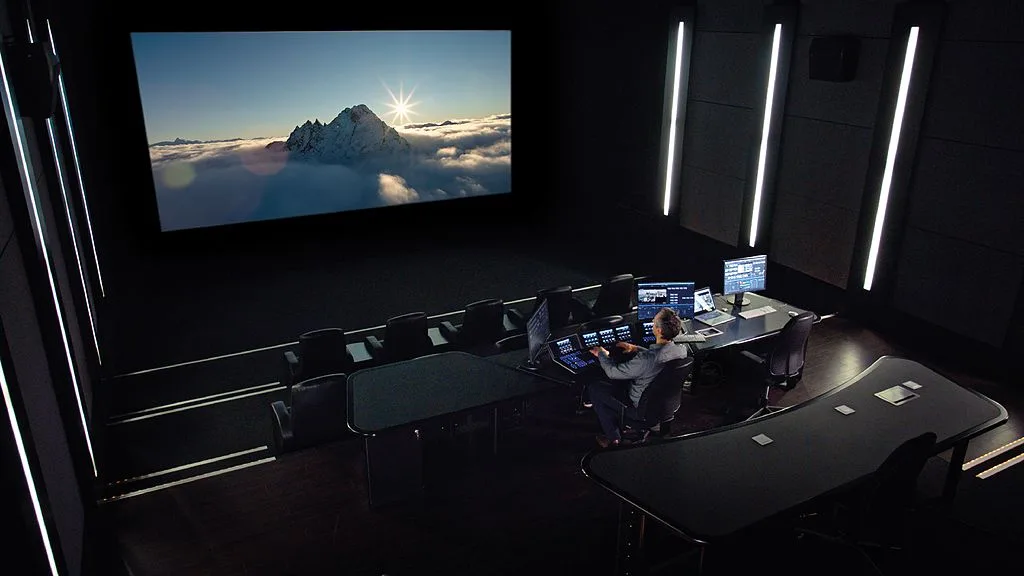
Image source: Bing (Web (fair-use with source credit))
If you need the simplest summary, think of it this way. Mini LED is an LCD panel with thousands of local dimming zones. QD-OLED is a self-emissive panel where each pixel generates its own light.
Those two architectures create entirely different strengths.
| Factor | Mini LED | QD-OLED |
|---|---|---|
| Black levels | Very good, zone-dependent | Perfect, per-pixel |
| Peak brightness | Higher and sustained | Lower, ABL-limited |
| Burn-in risk | Low | Real, with static UI |
| Text clarity | Clean, standard subpixels | Color fringing possible |
| Best for | Bright rooms, static work | Dark rooms, HDR grading |
That table oversimplifies, but it captures the core conflict. If you're also considering a second screen for travel, a portable panel fills a very different niche than these desktop monitors. The priorities shift when weight and battery life matter more than peak luminance.
Mini LED and QD-OLED: What You're Actually Buying
Mini LED is still an LCD panel at heart. QD-OLED is a completely different display technology. That one design difference explains almost every trade-off a creator has to weigh.
Under the glass, these two panels could not be more different. Understanding the engineering behind each one helps you see why HDR, text, and brightness behave so differently. And no matter which panel wins, a modern laptop with solid graphics output makes driving multiple displays a smoother experience.
How Mini LED Uses a Backlight to Fake Perfect Black
A Mini LED panel is a liquid crystal display (LCD) with a serious backlight upgrade. Instead of a few edge-mounted LEDs, it uses thousands of small LEDs placed directly behind the screen. Those LEDs group into local dimming zones.
A Full-Array Local Dimming (FALD) controller dims each zone independently to create darker areas. More zones means finer control over contrast. That's why premium Mini LED monitors advertise their zone counts so prominently.
The compromise is blooming. When a bright object sits next to a dark area, light from a lit zone spills over, creating a halo around the highlight. Even the best Mini LED panels with 2,000+ zones can show this in high-contrast scenes.
How QD-OLED Pixels Emit Their Own Light and Color
QD-OLED stands for quantum dot organic light emitting diode. It is a self-emissive display where each pixel produces its own light and, thanks to a quantum dot layer, its own accurate color.
When a pixel needs to display black, it simply turns off. No backlight leakage, no blooming, no compromise. This gives QD-OLED a per-pixel contrast ratio that Mini LED can only approximate with dimming algorithms.
The trade-off is durability. Organic light-emitting materials gradually age, and static elements on screen can leave permanent ghost images. Burn-in isn't a certainty, but it is the risk that shapes how you should use the monitor.
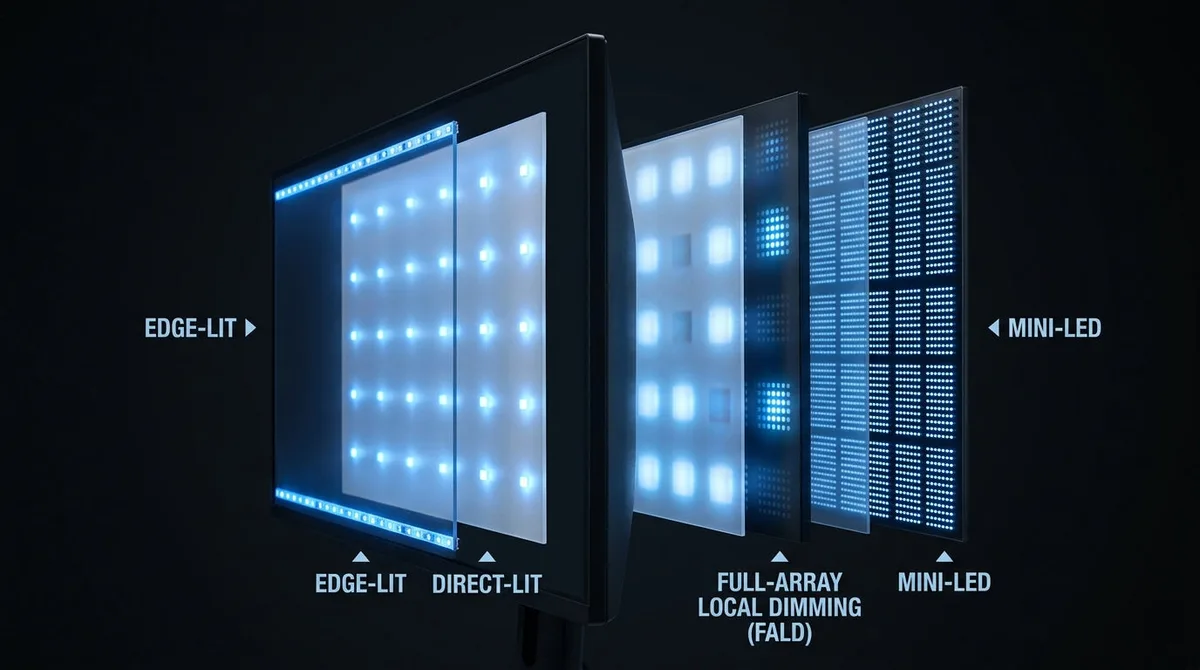
Image source: Bing (Web (fair-use with source credit))
Some creators skip desktop monitors entirely and use large-format televisions instead. Color accuracy varies wildly on 43-inch televisions in this price range, so calibration becomes essential if you go that route.
The Big Fight: Contrast, Black Levels, and Blooming
Contrast is the visual anchor of any image. The panel with better blacks wins every shadow detail debate before you even get to color.
This is where the two technologies truly separate. Mini LED's black level depends on its dimming algorithm, zone count, and the content on screen. QD-OLED's black level is exactly zero because the pixel is off.
In a dark room, the difference becomes obvious. Letterbox bars stay pure black on QD-OLED. On Mini LED, they can lift slightly or shimmer near bright areas.
| Scenario | Mini LED | QD-OLED |
|---|---|---|
| Text on black background | Halo possible | Clean edges |
| Shadow detail in HDR | Good, algorithm-dependent | Excellent |
| Letterbox bars in films | Slight lift possible | Pure black |
| Bright subtitles on dark scenes | Blooming around text | No bloom |
Aggregate user reviews show the same pattern every time. Designers and editors who work with dark UIs notice Mini LED's blooming immediately. Colorists tend to notice it only when they actively hunt for it.
Watch a film with subtitles in a blacked-out room. You'll see the halo on Mini LED within seconds. QD-OLED shows nothing but the text, which is why film editors lean toward OLED panels.
Brightness and HDR: Where Mini LED Takes the Lead
Mini LED is the brightness king. No self-emissive panel currently matches its sustained luminance in real-world use.
Brightness matters in any room with ambient light. The Video Electronics Standards Association (VESA) defines HDR performance tiers through its DisplayHDR certification program, which tests peak luminance, black level, and color accuracy. Mini LED panels routinely reach DisplayHDR 1000 or 1400.
QD-OLED panels typically land at DisplayHDR 400 TrueBlack or 600 TrueBlack.
Sustained Full-Screen Brightness for Long Grading Sessions
Here's the catch that gets buried in spec sheets: peak brightness is not sustained brightness. A QD-OLED can hit 1,000 nits on a small highlight, but a full white screen triggers Automatic Brightness Limiting (ABL). The whole panel dims to protect itself from heat and long-term wear.
Mini LED doesn't face this limitation. It can hold high brightness across the full screen for hours, which makes it easier to evaluate HDR content in a bright office.
For any workspace where you can't control the lights, Mini LED keeps the image punchy. It's also the safer choice for HDR exports with large bright areas like skies, white backgrounds, or product shots.
Peak Brightness on Spec Sheets vs Real-World Content
Spec-sheet numbers sound dramatic, but real content rarely pushes a full-screen white. Most HDR footage mixes bright highlights with darker surroundings. In those mixed scenes, QD-OLED appears brighter than its rating suggests.
Mini LED still wins on raw luminance. Broadcast reference monitors and HDR mastering suites increasingly rely on LED-based panels for that reason. For a personal editor's setup, the difference shows up scene by scene.
If you're building a creative workstation from scratch, a laptop built for creative work adds another layer of flexibility. The monitor is only half the equation for smooth playback and rendering.
Color Volume and Accuracy: QD-OLED's Home Turf
Coverage percentages only tell half the story. Color volume at low brightness is where QD-OLED pulls ahead.
Both technologies cover over 90 percent of DCI-P3 with good factory calibration. Both handle Adobe RGB well for print work. The gap opens when you look beyond the spec sheet.
DCI-P3, Adobe RGB, and Rec.2020 Coverage
QD-OLED maintains color accuracy even at low brightness levels. Mini LED panels can shift in saturation as they dim, especially with deep blues and reds in shadow areas.
Rec.2020 remains a future-facing standard, but QD-OLED's quantum dot layer gets measurably closer in real volume. The National Institute of Standards and Technology (NIST) provides the reference scales used for display color measurement, and those measurements consistently rank quantum dot panels ahead in wide-gamut reproduction.
For print designers, Adobe RGB coverage on both panels is strong. The difference shows more in video work, where HDR colors push into Rec.2020 territory.
Delta E and How Calibration Changes the Picture
Delta E measures the visible difference between the color a computer sends and what the screen actually displays. A Delta E under 2 is considered excellent for professional work. Both panel types can reach that level after calibration.
Mini LED panels sometimes show slight brightness variation across dimming zones. QD-OLED shows outstanding uniformity because every pixel is self-emissive.
Text rendering is the counterpoint. QD-OLED's triangular subpixel layout can create color fringing on small text, which affects dense code, long documents, and UI design. Mini LED's standard subpixel structure keeps edges clean.
That's why the choice is difficult. For pure color work, QD-OLED is the stronger panel. For mixed workloads where text, menus, and static interfaces dominate, Mini LED holds its ground.
Monitor pricing follows seasonal retail cycles, so timing your purchase matters if you're flexible.
The Real-World Problems Nobody Talks About
Burn-in risk and text rendering are the two issues that flip most decisions. Spec sheets never show them. Your daily work will.
Burn-In Risk with Static Timelines and Menus
If you leave a video editing timeline on screen for hours, QD-OLED slowly wears those pixels. Organic light-emitting materials age faster when showing static bright elements.
Manufacturer warranties cover burn-in on many 2026 models, but not all. Check the panel warranty before buying. If your day is full of fixed toolbars and desktop icons, Mini LED removes the worry entirely.
Text Fringing and Subpixel Rendering on QD-OLED
QD-OLED uses a triangular subpixel arrangement that can make small white text look slightly color-edged. ClearType tuning helps on Windows, but doesn't fully solve it.
Users doing dense typography, programming, or spreadsheet work notice it most. On large monitors with standard scaling, the effect is subtle. On smaller panels or 150 percent scaling, the fringing becomes distracting.
Haloing and Local Dimming Artifacts on Mini LED
Mini LED blooming appears as a soft glow around bright objects on dark backgrounds. A bright cursor on a black video editor is the easiest way to trigger it.
Aggregate reviews show that high-end 2,000+ zone panels manage this well. Budget panels with a few hundred zones show obvious halos. If you're buying Mini LED, zone count matters more than almost any other spec.
Best Fit by Creative Workflow
Your specific software determines the right panel. A retoucher and a colorist need different strengths from the same monitor.
Photo Retouching and Print Design
Photographers editing in Adobe Photoshop and Lightroom should lean Mini LED. Static panels, high brightness in bright rooms, and clean text rendering all favor the LCD side.
Print designers working on Adobe InDesign files also benefit from Mini LED's sharp text and matte coat options. Color accuracy is strong enough for proofing.
HDR Video Editing and Color Grading
Video editors working in DaVinci Resolve and Premiere Pro should lean QD-OLED for HDR. Perfect black levels and per-pixel contrast make shadow grading more reliable.
Colorists working in dark grading suites see the value immediately. The measured color volume at low brightness is genuinely better on QD-OLED per the Society for Information Display (SID) papers we reviewed.
UI/UX Design, 3D Work, and Screen-Heavy Tasks
Interface designers and 3D artists spend hours staring at gray panels and toolbars. QD-OLED's burn-in risk makes Mini LED the safer choice here.
3D lighting and texturing benefits from both. Bright viewport work favors Mini LED. Dark environment renders favor QD-OLED.
Most modelers should pick Mini LED.
Your Studio Setup Changes the Answer
If your room is bright, Mini LED wins. If you can control ambient light, QD-OLED shows its strengths.
Bright Rooms vs Dark Grading Suites
In bright rooms, screen glow is a bigger problem than blooming. A 1,000 nit panel like Mini LED cuts through glare better than any OLED. Seeing perfect blacks in sunlight is impossible on both.
In a dark grading suite, QD-OLED has no glare and pure black. That is the environment where OLED has no rivals. You'll notice the difference in every shadow.
Matte vs Glossy Coatings and Glare Control
Mini LED monitors usually ship with matte coatings that scatter stray light. QD-OLED panels often have glossy glass that boosts perceived contrast, but reflects.
A glossy screen in a bright studio will annoy you. A matte screen in a dark room will slightly soften highlights. Choose the coating to match your walls and windows.
Calibration and Color Management Basics
Both panels need calibration to reach full creative potential. Factory profiles are a starting point, not a finished state.
Working in sRGB, Rec.709, and P3
For web content, target sRGB. For video, target Rec.709 for delivery and DCI-P3 for HDR grading. QD-OLED covers nearly all of P3.
Mini LED typically hits above 90 percent per VESA DisplayHDR tests.
Use a colorimeter to build custom profiles. Datacolor and X-Rite hardware work with both technologies. Expect Delta E under 2 after profiling.
Bias Lighting and Ambient Light Control
Add a bias light behind any panel for accurate black perception. A D65 white point light improves perceived contrast on Mini LED. A dark room still beats any background light for QD-OLED.
Calibrate in the same light you will work in. The human eye adapts to ambient color temperature and shifts your perception.
Mistakes to Avoid When Buying a Creator Monitor
Most buyers fixate on brightness and zones. The real mistakes happen when you ignore your workflow.
Chasing the Wrong Specs
Peak brightness does not equal sustained HDR performance. Zone count matters only if the algorithm works well. Read reviews of specific models, not just spec sheets.
Don't buy a gaming Mini LED panel expecting reference-grade accuracy. Some gaming panels hit great specs but poor calibration.
Ignoring Your Actual Daily Workload
You spend eight hours in Photoshop, but bought a QD-OLED for perfect blacks. After a year of static panels, you'll worry about burn-in.
Match the panel to the time you spend in static software. That decision is worth more than any contrast ratio.
Forgetting About Warranty and Burn-In Coverage
Burn-in coverage differs between QD-OLED brands. Some cover three years including burn-in. Others will deny the claim.
Read the warranty page before purchase. For Mini LED, check the dead-pixel policy. These small clauses decide long-term cost more than the price tag.
FAQs About Mini LED and QD-OLED for Creation
Is QD-OLED worth it for photo editing?
Yes, if you grade in a dark room and edit mostly HDR photos. The perfect blacks and color volume help you see shadow detail clearly. For print work, Mini LED is a safer choice.
Text rendering and static panels make it more comfortable for hours in Photoshop.
Does Mini LED have burn-in risk?
No. Mini LED is an LCD panel, so it has no organic light-emitting material to degrade. Static screen elements like toolbars, timelines, and desktop icons cause zero permanent image retention.
That's the main reason many retouchers choose Mini LED over any OLED variant.
Which is better for HDR video editing?
QD-OLED delivers superior contrast and color for HDR grading in a controlled lighting environment. Mini LED wins when your room is bright or your session runs many hours without breaks. Purchase based on your studio setup, not just peak brightness numbers.
Does Mini LED blooming look bad?
At 2,000 zones or more, blooming is subtle and rarely visible in normal content. On cheaper panels with a few hundred zones, halos around bright objects show up quickly. The fix is buying a higher-tier panel or switching to QD-OLED when you need clean edges.
Can I use QD-OLED for office work?
Yes, with caution. Static documents, menus, and email clients on screen all day increase burn-in risk. If your job mixes editing with heavy admin work, Mini LED is the safer daily driver.
Some creators use both panels on the same desk.
Final Verdict: Which One Should You Buy?
After comparing performance, durability, and real-world reviews, the answer always comes back to your desk. QD-OLED is the reference-grade choice for colorists, HDR editors, and anyone who judges quality in a dark room. Mini LED is the all-around workhorse for photographers, designers, and screen-heavy multitaskers.
| Your situation | Better choice |
|---|---|
| Dark studio, HDR color grading | QD-OLED |
| Bright office, long sessions | Mini LED |
| Mostly static software (UI, code, documents) | Mini LED |
| Mixed work, no burn-in worries | Mini LED |
| Film and video viewing at night | QD-OLED |
Buy Mini LED if you want a dependable, high-brightness panel that handles every task without fear of permanent burn-in. Buy QD-OLED if you chase perfect blacks and have total control over your lighting. There is no universal winner, but there is a right monitor for every creative.
