

Is Mini LED display better for color grading? The honest answer is: it depends on the work you do and the room you grade in. Mini LED is a real upgrade over standard LCD, but it still isn't a true replacement for OLED or dedicated reference monitors.
For many editors and content creators, though, it's the most practical option in 2026.
The question keeps coming up because Mini LED solves one big problem while adding another. It uses thousands of local dimming zones for deep blacks and high HDR brightness, but those same zones can create halos around bright objects. Knowing exactly where those trade-offs land helps you decide where to spend your money.
The Short Answer: Is Mini LED Good Enough for Color Grading?
Yes, for most HDR grading work, especially if you edit in a bright room. No, if you're mastering SDR content, doing critical near-black adjustments, or grading in a fully dark suite. Mini LED is genuinely good, but it's not a reference-grade replacement.
Mini LED sits between consumer monitors and professional reference displays. It gets brighter than most OLED panels for sustained HDR, it won't burn in, and it costs far less than a true HDR reference monitor. The trade-off is that local dimming artifacts, particularly blooming around bright objects on dark scenes, can distract you during critical decisions.
For web content, YouTube, and some broadcast deliverables, it's honestly fine. For theatrical HDR finishing, you'll want per-pixel contrast control instead.
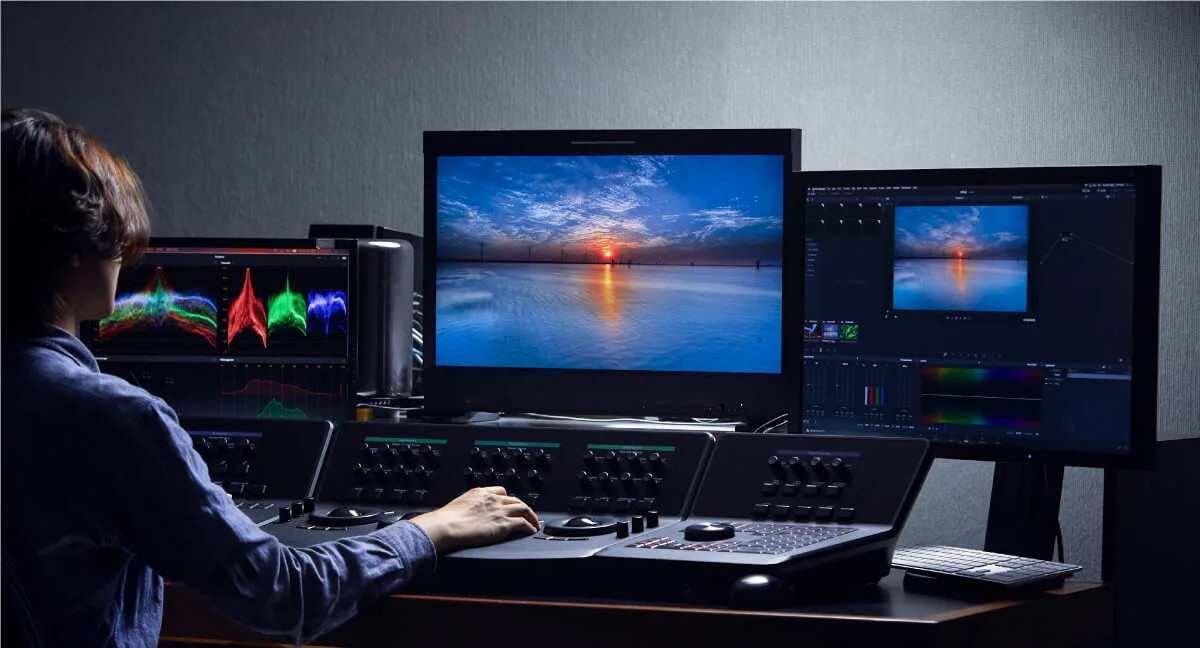
Image source: Bing (Web (fair-use with source credit))
What Mini LED Actually Does Differently
Mini LED isn't a new panel type. It's still an LCD panel. The difference is the backlight.
Traditional LED monitors use a few large backlights that illuminate the whole screen at once. Mini LED shrinks those LEDs dramatically, so a display can fit hundreds or thousands of small backlight zones. Each zone can brighten or dim independently.
That's what gives Mini LED its high contrast and deeper blacks.
A standard IPS monitor often has no local dimming at all. A decent Mini LED monitor has 384, 576, or even 1,152 zones. High-end models push past 2,000.
More zones means finer control over light and better-looking shadows.
That matters for grading because contrast changes how you perceive color. A scene that looks flat on a normal LED monitor can look rich and dimensional on Mini LED. But zones also create visual artifacts, and those artifacts are the catch.
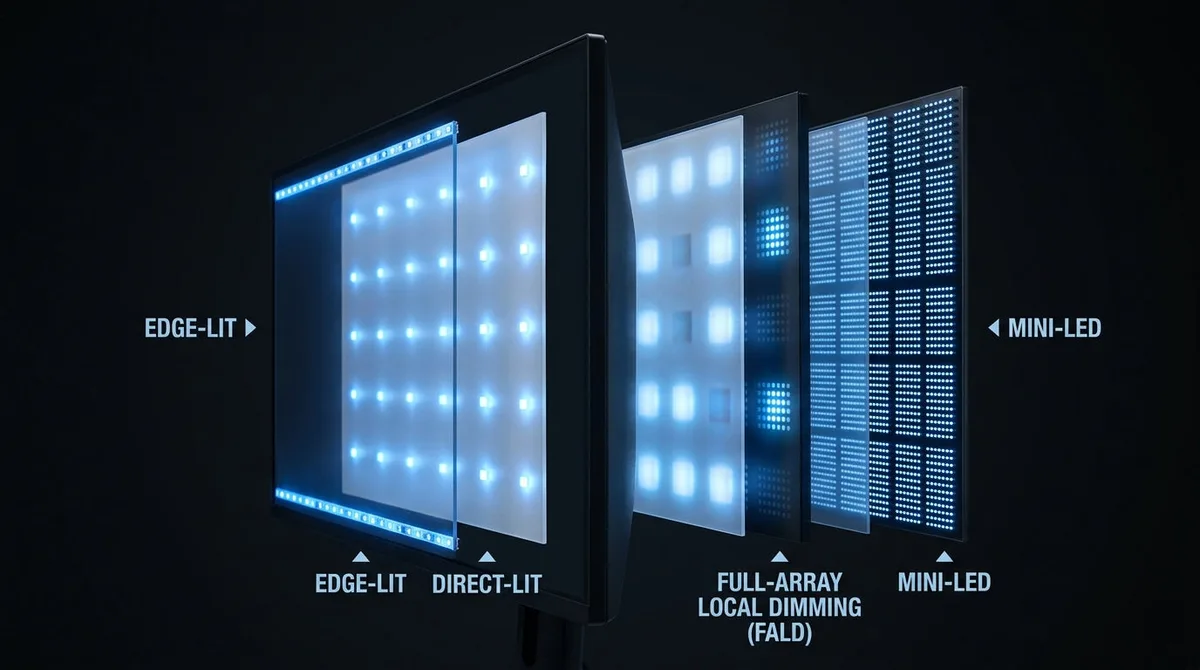
Image source: Bing (Web (fair-use with source credit))
Local Dimming and Zone Counts
Local dimming is the system that controls backlight zones. The technical name for this is Full-Array Local Dimming (FALD). When a bright object appears, the zones around it light up.
When the scene goes dark, those zones dim.
The key spec is zone count. A monitor with 288 zones beats one with none. But 1,152 zones is dramatically better than 288, because each zone covers a smaller area of the screen.
Here's the problem: zones aren't pixels. A single zone might cover a few thousand pixels. When one zone lights up to show a star or a lamp, the entire zone glows.
Dark pixels inside that zone get lit too, which creates halos around the bright object.
Quantum Dot Color Enhancement
Most Mini LED monitors also include a quantum dot film. Quantum dots are tiny semiconductor particles that convert blue backlight light into pure red and green light.
The result is a wider color gamut. Many Mini LED monitors cover 95 to 99 percent of DCI-P3, the color space used for HDR video delivery. That's a big deal for colorists, because working in a wider gamut means you can see and adjust colors that standard displays can't show.
It's one reason Mini LED feels like a genuine upgrade over older LED tech, especially for HDR projects.
What a Color Grading Monitor Truly Needs
Before judging Mini LED, it helps to know what "good" actually means for a grading display. Colorists don't just look at pretty pictures. They check scopes, match skin tones, and verify shadows across shots.
Here's the short list:
- Color accuracy: Delta E under 2, ideally under 1
- Wide gamut: at least 95 percent DCI-P3 coverage
- Stable brightness: no automatic dimming that shifts over time
- Deep blacks: for judging shadows and near-black details
- Uniformity: even brightness and color across the whole panel
- Calibration support: open LUT controls and adjustable gamma
Mini LED monitors check many of these boxes. The best ones ship with factory calibration reports, hit Delta E under 2, and cover over 98 percent of DCI-P3. Brightness stability is solid too, since Mini LED handles high sustained output without struggling.
Black level performance is where things get complicated. LCD panels, even with local dimming, still leak some light. Zone count and the dimming algorithm determine how visible that leakage is.
For a colorist working on a dark film scene, that matters. You can manage it, but you can't make it disappear.
If you're setting up a home grading station, the computer driving the monitor matters just as much. A powerful editing laptop with a discrete GPU and accurate display output makes calibration far easier.
Also, don't overlook the power cost of running equipment all day. A pro monitor can pull 150 watts or more at full brightness, and that adds up over a busy week.
Mini LED vs OLED vs Standard IPS: The Honest Comparison
Here's the honest side-by-side of the three main options.
| Spec | Mini LED | OLED | Standard IPS | | Black levels | Good, zone-dependent | Perfect | Weak | | Peak brightness | Excellent, 1000+ nits | Moderate, ABL limits | Moderate, ~350 nits | | Sustained HDR brightness | Excellent | Dims over time | Poor | | Color gamut | Wide with quantum dots | Excellent, wide | Moderate | | Uniformity | Good | Excellent | Variable | | Blooming / halos | Noticeable | None | None | | Burn-in risk | None | Real with static UI | None | | Price | Mid-range to high | High | Low |
Each one wins in different grading scenarios.
Mini LED is the best pick for HDR grading in a bright room. It stays bright without dimming, and the high luminance makes HDR highlights feel punchy and alive.
OLED is better for dark-room SDR mastering. Perfect blacks reveal every shadow detail, and there's no blooming to second-guess your eyes.
Standard IPS is honestly not ideal for serious grading. It's fine for editing and rough color work, but the contrast ratio is too low for trusted decisions.
Editorial analysis of current models confirms the gap between Mini LED and OLED is closing. As of 2026, zone counts keep climbing and blooming is becoming less offensive on high-end Mini LED monitors. If you're on the fence, it might be worth timing your purchase to the right season to save some money.
Why Blooming and Halos Ruin the Grading Experience
Blooming is the halo effect you see around bright objects on dark backgrounds. It happens when a backlight zone lights up a small bright area but also illuminates the darker pixels around it.
In normal content, it looks like a soft glow. In grading, it's a real issue.
When you adjust contrast or color balance, your eyes lock onto edges and transitions. Halos add fake transitions that don't exist in the footage. That makes it hard to judge how deep a shadow should be, or how much roll-off a highlight needs.
The worst case is text and graphics. White titles on a black background glow like a neon sign. If you handle broadcast graphics or subtitle work, that's a daily annoyance.
More zones reduce blooming, but they don't eliminate it. That's a physical limit of LCD backlight technology. OLED doesn't have this problem because each pixel emits its own light.
That's why professional mastering monitors from companies like Sony and Flanders Scientific still favor self-emissive tech for critical work.
So when is the blooming tolerable? When the footage is bright, or when the scene doesn't have extreme contrast. For nature footage, interviews, and action scenes, it's barely noticeable.
For a single candle in a dark room, it's distracting.
That's the main reason colorists still pick OLED for critical grading. Perfect blacks without halos beat high brightness when the scene demands subtlety.
But here's a thought: if you mostly work with HDR and you're always in a well-lit room, the blooms won't bother you nearly as much. That makes Mini LED a smarter investment for many independent editors. And if you often check your work on the go, a good portable grading panel can help you stay consistent.
If you're shopping for HDR performance, always check whether the monitor meets the official VESA DisplayHDR specification for brightness and color metrics. That gives you a solid baseline before you trust the marketing numbers.
When Mini LED Makes Sense for Your Workflow
Mini LED is the sweet spot for editors who do a mix of editing, color, and gaming. It gets bright enough for real HDR without forcing you into OLED territory.
If you grade in a naturally bright room, Mini LED beats OLED. Windows and overhead lights wash out OLED panels, which typically peak around 600 to 800 nits. A good Mini LED panel holds 1000 to 1400 nits sustained, so HDR highlights stay punchy in daylight.
It also makes sense if you produce for YouTube or the web. Your viewers watch on mediocre screens, so you don't need perfect blacks. You need accurate colors, and Mini LED delivers that with wide gamut coverage.
For client review sessions, sustained brightness is a gift. A 1000-nit Mini LED panel shows the intended HDR look without dimming over time. OLED panels trigger an auto-brightness limiter that dims bright scenes, which is the last thing you want while a client watches a sunset shot.
Mini LED also pairs well with a secondary display. Many colorists keep a grading monitor for reference and a portable editing panel for the UI. That keeps static interface elements off the critical screen.
| Who benefits from Mini LED | Why |
|---|---|
| Independent colorists on a budget | Pro-level brightness without reference prices |
| HDR editors in bright rooms | Sustained luminance beats OLED in daylight |
| Content creators for web | Wide gamut at a reasonable cost |
| Mixed-use setups | Grading plus gaming without burn-in risk |
When You're Better Off With OLED or a Reference Monitor
If you master SDR content for theatrical or broadcast, OLED is the safer choice. Perfect black levels and zero blooming make shadow detail trustworthy.
Reference monitors from companies like Sony and Flanders Scientific use self-emissive tech for a reason. A reference-grade OLED eliminates the backlight's guesswork. You see the actual pixels, not the zones trying to replicate them.
That matters most for near-black scenes. Grading a dark forest at night on Mini LED means fighting halos around every highlight. The halo acts like a gamma cheat.
Your scopes report the truth, but your eyes keep second-guessing it.
OLED burn-in is a real issue if you leave static UI elements on screen all day. Professional suites hide the interface during reviews, so the risk is manageable.
Stick with OLED or dual-layer LCD when you need zero artifacts. Broadcast deliverables, theatrical masters, and VFX-heavy compositing all demand it. Mini LED is closing the gap, but it hasn't closed it.
Calibration and Workflow Tips for Mini LED Displays
Calibrating a Mini LED monitor requires more decisions than a standard IPS panel. The biggest one is whether to calibrate with local dimming on or off.
For SDR grading, calibrate with local dimming off. You want a stable baseline for Rec.709 and BT.1886 gamma. Turn it on only when reviewing HDR content.
For HDR, keep local dimming active and use a 3D LUT loader inside your grading software.
Here's a clean workflow that works across most Mini LED displays:
- Set the monitor to its wide gamut mode, usually DCI-P3 or Rec.2020.
- Use a colorimeter like the X-Rite i1Display Pro or Datacolor SpyderX.
- Target D65 for white point and gamma 2.4 for SDR video.
- Set SDR brightness between 100 and 120 nits.
- For HDR, calibrate the PQ curve in your software, not in the monitor's OSD.
Bias lighting helps too. A strip of D65 LEDs behind the monitor keeps your perception stable and reduces eye strain. It won't remove blooming, but it makes contrast look more consistent over long sessions.
Firmware updates matter more than people think. Mini LED dimming algorithms are complicated, and manufacturers like Asus and BenQ keep improving them after release. Update the firmware before you calibrate, or you'll be chasing a moving target.
How to Test a Mini LED Monitor Before Trusting It
You can't judge a Mini LED display from spec sheets alone. You need real-world tests, and you need to run them before your return window closes.
Start with a test pattern that shows a bright star on a black background. This is the classic blooming test. If the star looks like a small sun with a glowing smear, the dimming algorithm is weak.
Then run a grayscale gradient. Show a smooth ramp from black to white. Look for banding, which appears as distinct steps instead of a smooth transition.
Banding is more visible on Mini LED than on true 10-bit OLED panels.
Display a solid gray field at 50 percent brightness. That checks panel uniformity. IPS panels often have lighter corners or dark patches.
Mini LED helps slightly, but it can't fix everything.
Finally, load a dark film scene with motion. Local dimming zones need to switch quickly. Slow algorithms cause the backlight to lag behind moving objects, creating a visible swim effect.
If you see artifacts, try adjusting the zone dimming strength in the monitor's OSD. Low dimming reduces halos but also reduces contrast. High dimming looks punchy but can burn your eyes on dark scenes.
Common Mistakes to Avoid When Grading on Mini LED
The biggest mistake is grading SDR content with local dimming on. It creates fake contrast, which pushes you to crush shadows and blow out highlights. Your scopes lie, and your eyes believe them.
Another mistake is ignoring the monitor's firmware. Mini LED displays run on complex backlight software. Check for updates on the manufacturer's support page before you calibrate.
A single firmware revision can change the entire dimming behavior.
Don't rely on the monitor's built-in tone mapping for HDR mastering. That feature is designed for viewing, not for authoring. Use your grading software's HDR pipeline instead.
Built-in maps compress highlights in ways that can fool you into producing a dull master.
Avoid calibrating once and never touching it again. Mini LED backlights drift with temperature and age. Re-calibrate every three to six months if you're earning money with your monitor.
Also, leave your screen set to the correct color mode. Many users buy a Mini LED monitor and leave it in "Gaming" or "Vivid" mode, which oversaturates everything. Switch to the factory calibrated mode, tag it in your software, and don't flip it back.
Keeping a stable setup makes it easier to review your work on other devices without guessing.
Real-World Mini LED Options Worth Looking At
A few Mini LED displays stand out in the grading market right now. The Asus ProArt PA32UCX offers 1,152 zones with 99 percent Adobe RGB coverage. The Apple Pro Display XDR uses a 32-inch Mini LED panel with 576 zones and hits 1,600 nits peak.
The Asus ProArt PA32UCG is another strong choice, adding 1,200 nits of sustained brightness and a built-in hardware calibration engine. For budget-focused buyers, the Samsung Odyssey Neo G8 offers 1,196 zones, though it's aimed more at gaming than grading.
Here's a quick look at the common specs you'll see:
| Display | Zones | Peak Brightness | Gamut |
|---|---|---|---|
| Asus ProArt PA32UCX | 1,152 | 1,200 nits | 99% Adobe RGB |
| Asus ProArt PA32UCG | 1,152 | 1,600 nits | 99% Adobe RGB |
| Apple Pro Display XDR | 576 | 1,600 nits | 99% DCI-P3 |
| Samsung Odyssey Neo G8 | 1,196 | 2,000 nits | 95% DCI-P3 |
None of these are true reference monitors. But they're all capable grading displays for independent work, and they cost a fraction of what Sony and Flanders Scientific charge.
The Bottom Line: Should You Buy One?
Buy a Mini LED display if you grade HDR content in a bright room or work on web and social deliverables. It gives you real HDR brightness, wide color, and no burn-in risk at a price that doesn't break the bank.
Skip it if you master SDR for theatrical or broadcast in a dark suite. OLED or dual-layer LCD reference monitors are safer for that work. The halos and contrast drift will fight you all day.
For everyone else, Mini LED is the most practical upgrade you can make in 2026. It isn't a perfect reference monitor, but it's a massive step up from a standard IPS panel.
Frequently Asked Questions
Can Mini LED replace an OLED reference monitor?
No, not for critical SDR mastering. Mini LED still shows blooming and halos on high-contrast scenes. OLED's per-pixel control makes shadows more trustworthy in dark rooms.
For HDR web work, Mini LED is fine.
Why do Mini LED displays show halos around bright objects?
Halos come from local dimming zones. Each zone lights up an area larger than the bright object itself, so dark pixels nearby get lit too. More zones reduce the effect but never eliminate it.
What zone count do I actually need for color grading?
Aim for at least 1,152 zones if you can afford it. Lower counts around 384 zones work for bright content but struggle with dark cinematic scenes. Above 2,000 zones, blooming becomes barely noticeable.
Is Mini LED better than OLED for HDR color grading?
For bright room HDR work, yes. Mini LED sustains higher brightness without triggering an auto-brightness limiter. OLED still wins for dark room grading because it has perfect blacks and no halos.
Do Mini LED monitors need special calibration?
No, they calibrate like other LCD monitors, but you should calibrate SDR with local dimming off. Then re-check HDR with it on. Use a colorimeter and a 3D LUT in your grading software for the best results.
